Get The Corner
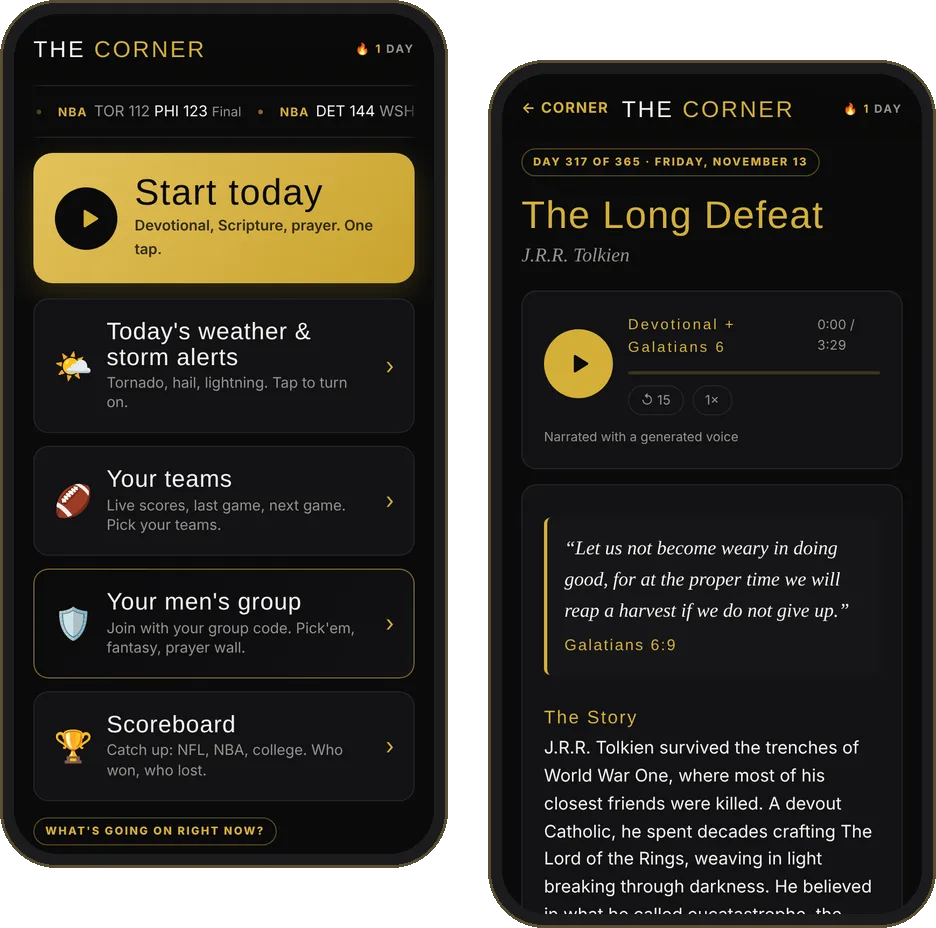
Your pocket corner-man. One tap plays today's devotional, the chapter and a prayer. Free. No login. No ads.
Works on iPhone and Android. Takes 10 seconds.
It's on your home screen. Open The Corner from there.
iPhone
- Open lionsdontbow.com/get in Safari.
- Tap Open The Corner below, then the Share button at the bottom.
- Scroll down and tap Add to Home Screen, then Add.
Android
- Open lionsdontbow.com/get in Chrome.
- Tap Download free at the top, then Install.
- No button? Tap the menu and choose Install app or Add to Home screen.
On a computer?
Point your phone's camera here.
lionsdontbow.com/get
What's inside
Built for men who show up
Questions
A free devotional app for men
Is The Corner really free?
Yes. The Corner is free, with no ads and no login. Your prayer list, teams and settings stay on your phone.
How do I download The Corner?
On iPhone, open lionsdontbow.com/get in Safari, tap Share, then Add to Home Screen. On Android, open it in Chrome and tap Install. It works like an app, with no App Store needed.
What is in the daily devotional?
Every day for 365 days: a Bible verse, a true story of a man who stood his ground, and a charge for today. One tap reads it aloud, then reads the full Bible chapter and leads you into prayer.
Is there a devotional app for men that reads the Bible out loud?
Yes. The Corner reads today's full Bible chapter aloud from the World English Bible, with each word lighting up as it is read so you can follow along.
Can my men's group use The Corner?
Yes. Join your group with a code to share a prayer wall, events, Pick'em and game chat with your brothers.
Free. Your info stays on your phone.